A one-minute summary
A health score and the few issues that matter most, in words a business owner understands.

For consultants and agencies: check a prospect’s website, send them a report with a personal note, and keep every lead moving. Free to start, with your own branding on every plan.
Free to start: 25 sample audits a month on the Free plan, in your own branding. No credit card required.
01What it is
It checks a website the way a search engine reads it, then shows the findings under your own brand instead of the tool’s, so you can send it to a prospect or client as your own work.
02What a good one includes
A health score and the few issues that matter most, in words a business owner understands.
Each finding names the page, what was found and how to fix it, most important first, instead of a 200-line dump.
Titles and descriptions, headings, broken links, page speed, indexing, structured data and local details.
Leave out scores with no explanation, fixes you will not offer, and anything that makes the report look generic.
03Sample audits
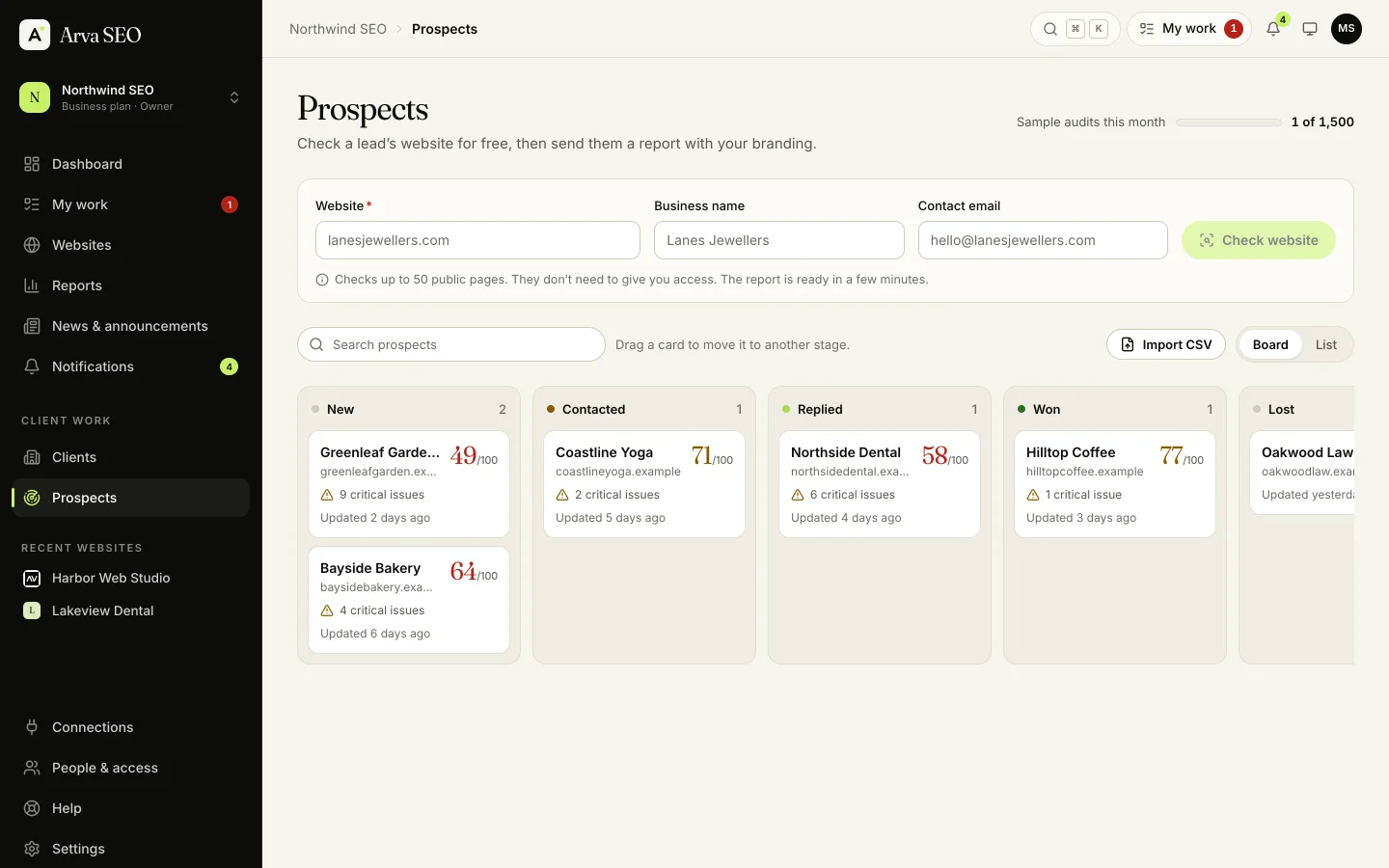
04Send one, step by step
Enter the prospect’s website. Arva SEO reads up to 50 public pages the way a search engine does. No login is needed.
Your name, logo and colours are on the report. Add a short personal note, and keep or remove the small “Prepared with Arva SEO” line.
Send a share link you can withdraw, or a PDF, with an email draft. Then move the lead along the board from New to Won.
05Follow each lead
New, Contacted, Replied, Won or Lost. Drag a card to move it, or search your prospects as a list.
Bring up to 1,000 leads from a spreadsheet or CRM as a CSV file. Columns are matched for you, and websites already in your prospects are skipped.
When a prospect signs, add their website and keep the same branding in reports and the client portal.
06Branding
07Plans
Each sample audit uses one from your plan’s monthly allowance. Compare the plans.
08Choosing a tool
Look past the label. Ask these questions before you commit to any tool.
In Arva SEO: your branding on every plan, 25 sample audits a month on Free, up to 50 public pages each, a share link or PDF, and replies to your own address. See also client reports and the portal.
09Common mistakes
An SEO audit report with your agency’s branding instead of the tool’s, so you can send it to a prospect or client as your own. In Arva SEO, reports carry your name, logo and colours on every plan, Free included, and one switch removes the small Prepared with Arva SEO line.
Yes. Arva SEO’s Free plan includes 25 sample audits a month in your own branding, with no credit card. Starter includes 50, Professional 300 and Business 1,500.
No. A white-label audit is a report with your branding. White-label SEO services mean someone else does the SEO work and you resell it. Arva SEO gives you the audit and the tools; you do the recommending.
A short summary and score, findings ordered by impact with the page, what was found and how to fix it, and the basics: titles, descriptions, headings, broken links, page speed, indexing, structured data and local details.
In Arva SEO, open Workspace settings, then Branding. Add your name, logo and colour, then tick Remove Arva SEO branding. It works on every plan.
Report emails reply to your own address on every plan, and come from your own domain on Professional and Business. On any plan you can also send the share link or PDF from your own email with the draft Arva SEO writes for you.
Up to 50 public pages of the prospect’s website, read the way a search engine reads them.
No login is needed: a sample audit reads public pages only, follows the website’s robots.txt and never changes anything.
Yes: 25 sample audits a month, in your own branding. Starter includes 50, Professional 300 and Business 1,500.
Prospects appears in the workspace menu once client work is on, under Settings, General, Client work.
11Related features
PDF reports and a client portal on every plan, with your own branding on every plan.
More than 70 checks on every page, an SEO Health score and a fix list.
Tasks from audit issues, My work as a list or a calendar, and saved views.
Check up to 50 pages of any public website right away.
12Start today
Create an account in a minute and check your first prospect’s website. No credit card required.